JavaScript this, call(), apply() & bind()
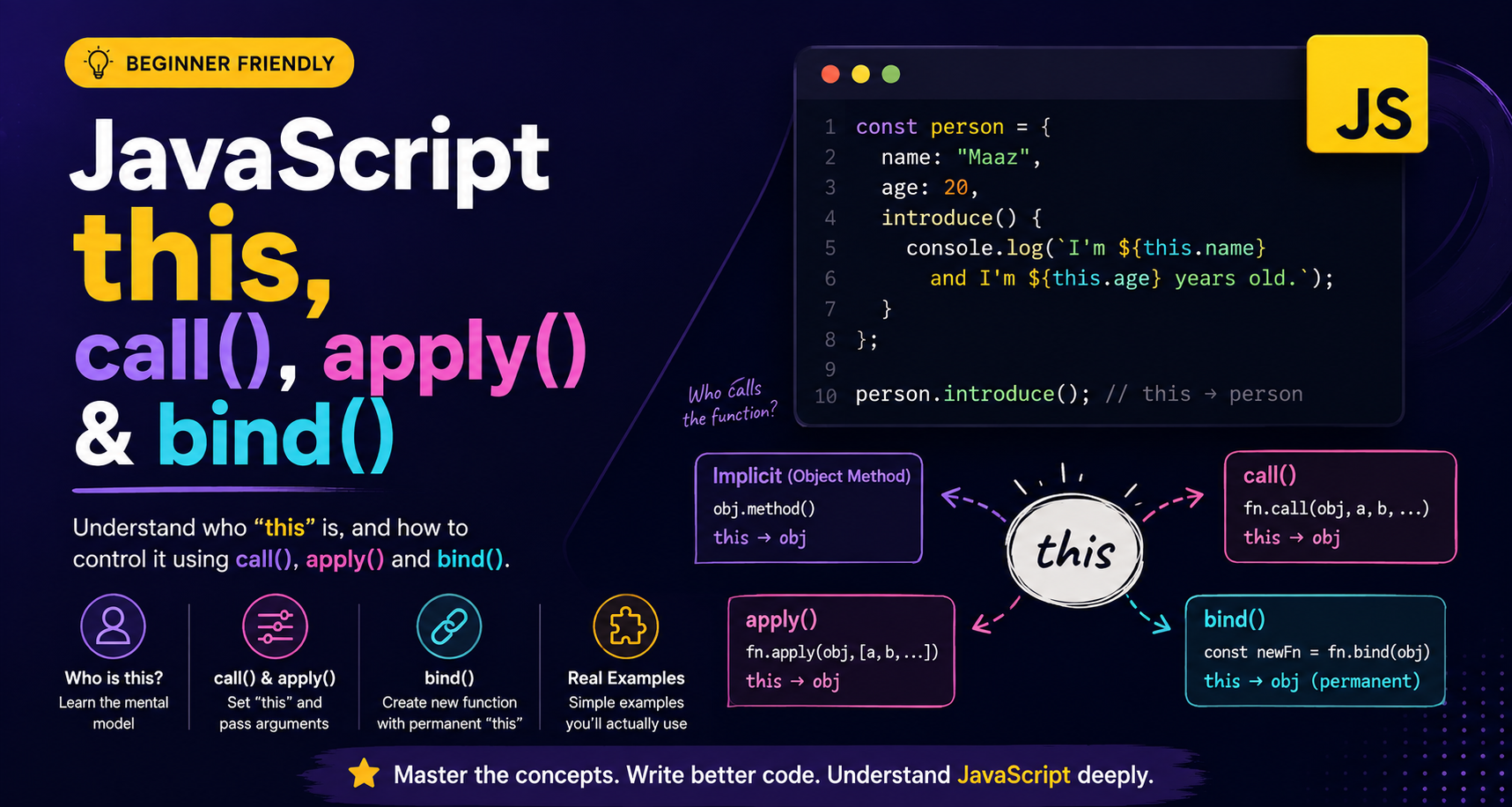
If you've ever seen JavaScript code like:
this.name
and wondered:
"What exactly is
this?"
You're not alone.
this is one of those JavaScript concepts that looks simple but becomes confusing when the same function is called in different ways.
The good news is that you don't need to understand complicated JavaScript internals to get started.
A powerful beginner-friendly way to think about it is:
thisusually tells us who is calling the function.
And when we want to control who this refers to, JavaScript gives us three useful methods:
call()apply()bind()
Let's understand all four concepts together.
What Does this Mean?
Consider this object:
const person = {
  name: "Maaz",
  age: 20,

  introduce() {
    console.log(`I'm ${this.name} and I'm ${this.age} years old.`);
  }
};
Now call the method:
person.introduce();
Who is calling introduce()?
person.introduce()
      │
      │ calls
      ↓
 introduce()
      │
      ↓
    this
      │
      ↓
   person
So:
this.name
means:
person.name
and:
this.age
means:
person.age
Output:
I'm Maaz and I'm 20 years old.
The mental model
When you're learning this, ask:
"Who is calling this function?"
For an object method:
object.method();
the object before the . is generally the value of this.
object.method()
      │
      ↓
   caller
      │
      ↓
    this
This simple rule will solve many beginner-level this problems.
this Inside Normal Functions
Now remove the object.
function greet() {
  console.log(this);
}

greet();
This is a normal function call.
There is no object before the function:
greet();
Therefore, this is not automatically the object you might expect.
In strict mode:
"use strict";

function greet() {
  console.log(this);
}

greet();
the result is:
undefined
In non-strict browser code, a regular function call can have this refer to the global object.
So don't memorize:
"
thisalways equals the caller."
A better rule is:
For normal functions,
thisdepends on how the function is called.
That's why this works differently:
person.introduce();
and:
introduce();
The calling style changed.
this Inside Objects
Object methods are where this becomes easiest to understand.
const user = {
  name: "Maaz",

  greet() {
    console.log(`Hello, ${this.name}`);
  }
};

user.greet();
The relationship is:
       user
        │
        │ calls
        ↓
      greet()
        │
        ↓
      this
        │
        ↓
       user
Output:
Hello, Maaz
But here's where JavaScript gets interesting.
What happens if we take the function away from the object?
const greetFunction = user.greet;

greetFunction();
We're no longer doing:
user.greet();
We're doing:
greetFunction();
The calling context has changed.
Before:

user.greet()
     ↓
 this = user


After:

greetFunction()
     ↓
Different calling context
     ↓
Different `this`
This is the key reason call(), apply(), and bind() are useful.
They allow us to control what this should refer to.
For a deeper dive, read this blog post.
Why Do We Need call(), apply() and bind()?
Imagine we have a function:
function introduce() {
  console.log(`I'm ${this.name}`);
}
The function expects this.name.
But by itself, it doesn't know which person's name we want.
We can explicitly tell JavaScript:
"For this function call, use this object as
this."
That's exactly what call() and apply() help us do.
And bind() lets us create a new function with this permanently set to the object we choose.
What Does call() Do?
The call() method allows us to call a function while explicitly choosing what this should refer to.
Syntax:
function.call(thisValue, arg1, arg2, ...);
Let's use a simple example:
function introduce() {
  console.log(`I'm ${this.name} and I'm ${this.age} years old.`);
}

const person = {
  name: "Maaz",
  age: 20
};

introduce.call(person);
Output:
I'm Maaz and I'm 20 years old.
What happened?
introduce.call(person)
          │
          ↓
    this = person
          │
          ↓
   introduce() runs
So call() basically lets us say:
"Call this function and use this object as
this."
Passing Arguments With call()
call() can also pass arguments individually.
function introduce(city, profession) {
  console.log(
    `I'm ${this.name} from ${city}. I work as a ${profession}.`
  );
}

const person = {
  name: "Maaz"
};

introduce.call(person, "Multan", "Software Engineer");
Output:
I'm Maaz from Multan. I work as a Software Engineer.
The structure is:
call(
  thisValue,
  argument1,
  argument2
)
For example:
introduce.call(person, "Multan", "Software Engineer");
                  │         │          │
                  │         └──────────┴── arguments
                  │
                  └── this
What Does apply() Do?
apply() is very similar to call().
It also:
Calls the function immediately.
Lets you choose what
thisrefers to.
The main difference is how arguments are provided.
With call():
introduce.call(person, "Multan", "Software Engineer");
Arguments are passed individually.
With apply():
introduce.apply(
  person,
  ["Multan", "Software Engineer"]
);
Arguments are passed inside an array (more precisely, an array-like argument list).
Example:
function introduce(city, profession) {
  console.log(
    `I'm ${this.name} from ${city}. I work as a ${profession}.`
  );
}

const person = {
  name: "Maaz"
};

const details = ["Multan", "Software Engineer"];

introduce.apply(person, details);
Output:
I'm Maaz from Multan. I work as a Software Engineer.
Think of it like this:
call()
  │
  ├── this
  ├── argument 1
  └── argument 2


apply()
  │
  ├── this
  └── [argument 1, argument 2]
call() vs apply()
The easiest way to remember the difference:
call()
→ arguments separately

apply()
→ arguments in an array
Example:
// call
fn.call(obj, 10, 20);

// apply
fn.apply(obj, [10, 20]);
Both call the function immediately.
Both allow you to control this.
Only the argument format is different.
What Does bind() Do?
Now comes the important difference.
bind() does not immediately call the function.
Instead, it creates a new function with this set to the object you provide.
Example:
function introduce() {
  console.log(`I'm ${this.name}`);
}

const person = {
  name: "Maaz"
};

const boundIntroduce = introduce.bind(person);
Nothing has been printed yet.
Why?
Because bind() only creates the new function.
We call it later:
boundIntroduce();
Output:
I'm Maaz
The flow is:
introduce.bind(person)
          │
          ↓
   New function created
          │
          ↓
   boundIntroduce
          │
          │ later
          ↓
   boundIntroduce()
          │
          ↓
     this = person
This is the biggest difference between bind() and the other two.
A Realistic bind() Example
bind() becomes especially useful when a function needs to be passed somewhere else but still needs the correct this.
For example:
const user = {
  name: "Maaz",

  greet() {
    console.log(`Hello, ${this.name}`);
  }
};

const greetUser = user.greet.bind(user);

greetUser();
Output:
Hello, Maaz
We created a new function that remembers:
this → user
Even though we're calling:
greetUser();
instead of:
user.greet();
The Big Difference: call() vs apply() vs bind()
Here's the comparison you should remember:
| Method | Calls immediately? | How arguments are passed | Main purpose |
|---|---|---|---|
call() |
✅ Yes | Individually | Call with a specific this |
apply() |
✅ Yes | Array | Call with a specific this |
bind() |
❌ No | Individually | Create a new function with fixed this |
The visual version:
                 Function
                    │
          ┌─────────┼─────────┐
          ↓         ↓         ↓
        call()    apply()    bind()
          │         │         │
          ↓         ↓         ↓
       Execute    Execute    Create
       now        now        new function
          │         │         │
      args:       args:      this:
      separate   array       fixed
One Example Showing All Three
Let's make the difference crystal clear.
function introduce(city, job) {
  console.log(
    `${this.name} lives in ${city} and works as a ${job}.`
  );
}

const person = {
  name: "Maaz"
};
Using call()
introduce.call(
  person,
  "Multan",
  "Software Engineer"
);
Calls immediately.
Arguments are separate.
Using apply()
introduce.apply(
  person,
  ["Multan", "Software Engineer"]
);
Calls immediately.
Arguments are inside an array.
Using bind()
const introduceMaaz = introduce.bind(
  person,
  "Multan",
  "Software Engineer"
);

introduceMaaz();
Doesn't call immediately.
Instead, it creates a new function that remembers the provided this and arguments.
A Simple Memory Trick
If you forget everything else, remember:
CALL
→ Call it now
→ Arguments separately

APPLY
→ Apply it now
→ Arguments as an array

BIND
→ Bind it for later
→ Returns a new function
Or:
Call = now Apply = now + array Bind = later
Borrowing Methods With call()
One useful feature of call() is method borrowing.
Imagine:
const person1 = {
  name: "Maaz",

  greet() {
    console.log(`Hello, ${this.name}`);
  }
};

const person2 = {
  name: "Ali"
};
person2 doesn't have a greet() method.
But we can borrow person1's method:
person1.greet.call(person2);
Output:
Hello, Ali
Why?
Because we explicitly changed this:
person1.greet
      │
      │ call(person2)
      ↓
  this = person2
      │
      ↓
Hello, Ali
The function comes from person1, but during this call, this refers to person2.
That's the power of explicitly controlling the calling context.
Your Practice Assignment
Try this yourself before looking back at the examples.
Step 1 — Create an object
Create an object with:
nameagea
introduce()method usingthis
For example, your object should conceptually look like:
person
├── name
├── age
└── introduce()
Step 2 — Borrow the method with call()
Create another object and use:
person.introduce.call(otherPerson);
Observe which person's data is printed.
Step 3 — Use apply()
Create a function that accepts two arguments.
Call it using:
functionName.apply(object, [arg1, arg2]);
Step 4 — Use bind()
Create a new function:
const newFunction = functionName.bind(object);
Then call it later.
Your goal is to understand what changes when you change the calling context.
The Mental Model to Keep
When you encounter this, start with one question:
"How is this function being called?"
Then remember:
object.method()
      ↓
this → object
If you want to manually control this:
call()
  ↓
Call now + separate arguments


apply()
  ↓
Call now + array arguments


bind()
  ↓
Create a new function for later
And the complete relationship becomes:
                    FUNCTION
                       │
            ┌──────────┴──────────┐
            ↓                     ↓
       Normal call          Explicit control
            │                     │
            ↓              ┌──────┼──────┐
     depends on how       call() apply() bind()
     it is called           │       │       │
                            ↓       ↓       ↓
                           now     now    later
What to Remember
JavaScript's this becomes much easier when you stop treating it as a mysterious keyword.
Think about the calling context.
When an object calls a method:
user.greet();
this generally refers to user.
When you need to explicitly control this, JavaScript gives you:
call()
apply()
bind()
The difference is simple:
call()
→ immediately calls the function
→ arguments separately

apply()
→ immediately calls the function
→ arguments as an array

bind()
→ does not call immediately
→ returns a new function
→ remembers the chosen `this`
The most important thing to remember is:
call()andapply()call a function now.bind()prepares a function to be called later.
Once you understand that relationship, this, method borrowing, and function binding become much less confusing—and you'll have a much stronger foundation for understanding JavaScript's more advanced object-oriented patterns.