Network Devices: Modem, Router, Switch, Firewall & Load Balancer
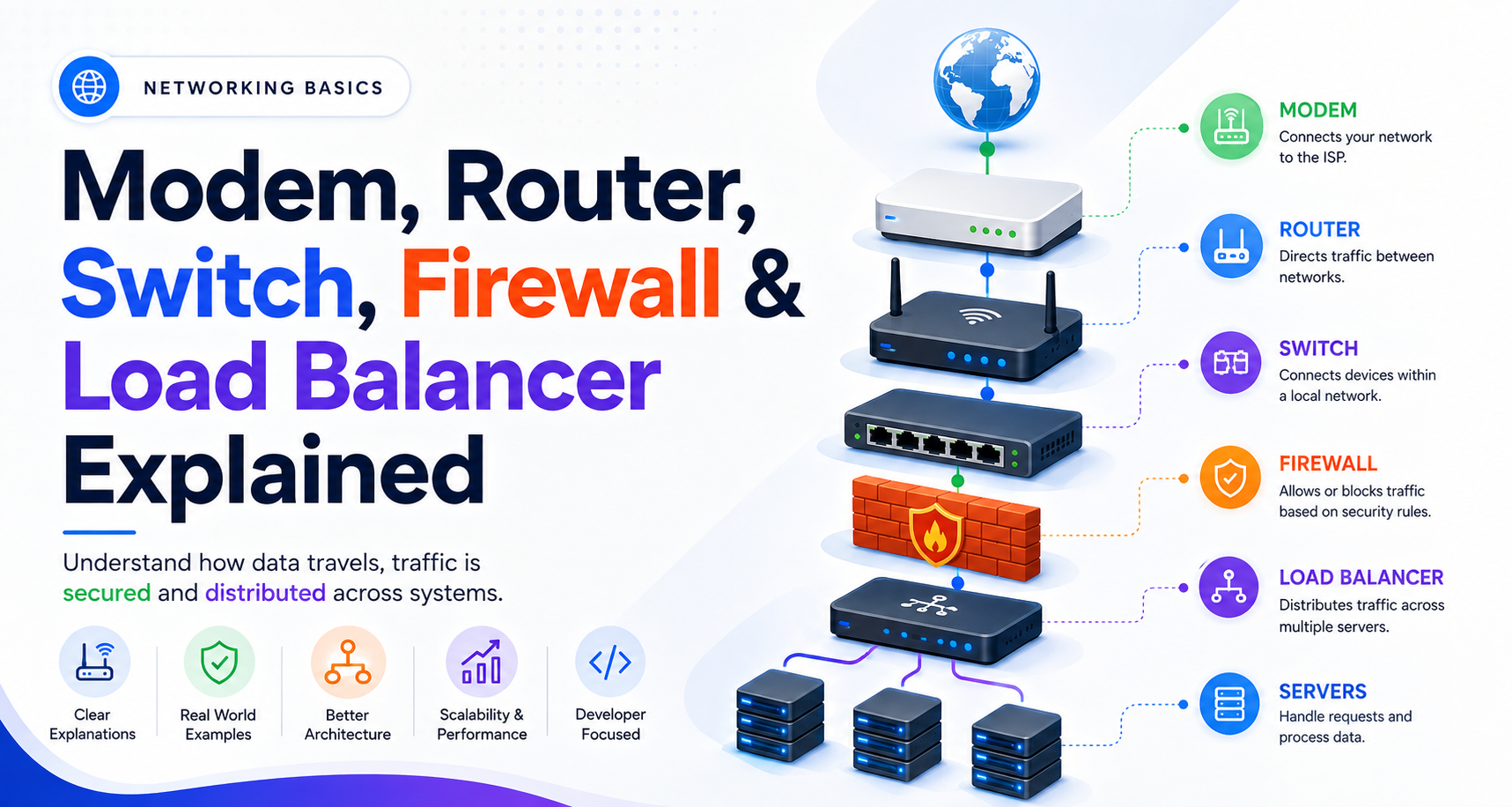
When you open a website, your request may travel through many systems before reaching the server.
Even in a simple home network, several devices can have different responsibilities:
Internet
   ↓
Modem
   ↓
Router
   ↓
Switch
   ↓
Your Devices
In larger networks, firewalls and load balancers can also become important.
Understanding these devices gives you a better picture of how networks work and what happens behind the scenes when your application communicates with another computer.
1. What Is a Modem?
A modem connects your local network to your Internet Service Provider (ISP).
The word modem comes from modulator-demodulator. Traditionally, its job was to convert signals between the format used by the ISP's connection and the digital data your network devices understand.
Think of the modem as the bridge between your network and your ISP.
Your Network
     ↓
   Modem
     ↓
    ISP
     ↓
 Internet
A modem does not primarily decide where traffic should go inside your home network. That is mainly the router's job.
Modern devices often combine a modem and router into a single box, which is why the distinction can sometimes be confusing.
2. What Is a Router?
A router connects different networks and decides where network traffic should go.
In a home network, your router connects your local devices to the internet.
For example:
Laptop ──┐
Phone  ──┼── Router ── Internet
TV     ──┘
The router looks at destination information in network packets and forwards traffic toward the appropriate network.
Think of it as traffic control.
It helps answer:
"Where should this traffic go next?"
A home router commonly also provides services such as NAT, DHCP, and Wi-Fi, although these are separate functions from routing itself.
3. Switch vs Hub
Inside a local network, devices may connect through a switch.
A switch forwards Ethernet frames between devices on a local network. It learns which devices are reachable through which ports by observing MAC addresses.
For example:
PC ──┐
     │
Laptop ── Switch ── Server
     │
Printer ─┘
A switch tries to send traffic only toward the port where the destination device is located.
What About a Hub?
A hub is much simpler.
When a hub receives a signal, it essentially broadcasts it out to all connected ports.
        Hub
     /  |  |  \
   PC  TV  PC Printer
A switch is more selective:
        Switch
     /  |  |  \
   PC  TV  PC Printer
       ↑
  Only the needed
  destination
This is why switches are much more useful than traditional hubs in modern Ethernet networks.
A simple way to remember:
Hub: send everywhere.
Switch: send where needed.
4. What Is a Firewall?
A firewall controls network traffic based on defined security rules.
It can inspect traffic and decide whether it should be allowed or blocked.
Think of it as a security gate.
Internet
   ↓
Firewall
   ↓
Internal Network
For example, a firewall might allow web traffic to a public server while blocking unauthorized connections to internal systems.
Firewalls can exist in different places, including network appliances, routers, operating systems, and cloud environments.
For software engineers, the important idea is that a firewall can control which network connections are allowed to reach your application.
5. What Is a Load Balancer?
Now imagine your application becomes popular.
One server may no longer be enough to handle all incoming requests.
Instead, you can run multiple servers:
             Server 1
           /
Users → Load Balancer → Server 2
           \
             Server 3
A load balancer receives incoming traffic and distributes it across multiple backend servers.
For example, if three servers are available, the load balancer can send different requests to different servers.
This provides several benefits:
Better scalability
Improved availability
Traffic distribution
Health checking
Easier server maintenance
Think of it like a toll booth system.
Instead of sending every car through one lane, traffic is distributed across multiple lanes.
If one backend server becomes unhealthy, a load balancer can often stop sending new traffic to it.
How Do These Devices Work Together?
Consider a simple web application deployed in production:
                    Internet
                       ↓
                    Firewall
                       ↓
                 Load Balancer
                  /     |     \
                 ↓      ↓      ↓
             Server 1 Server 2 Server 3
                       ↓
                    Database
For a home or small office network, the architecture may look different:
Internet
   ↓
Modem
   ↓
Router
   ↓
Switch
   ├── Laptop
   ├── Desktop
   ├── Printer
   └── Access Point
In some networks, one physical device may perform several of these roles. For example, a home gateway may combine a modem, router, switch, firewall, and Wi-Fi access point into one device.
The functions are still conceptually different even when the hardware is combined.
How This Connects to Software Engineering
As a developer, you may not configure physical network hardware every day, but these concepts appear constantly in backend and cloud architecture.
A production application might look like:
Client
  ↓
Firewall
  ↓
Load Balancer
  ↓
Backend Servers
  ↓
Database
When you deploy an API, scale your application, configure security rules, or troubleshoot why a server cannot be reached, understanding these components becomes extremely useful.
You can think of their responsibilities like this:
| Device | Main Responsibility |
|---|---|
| Modem | Connects your network to the ISP |
| Router | Directs traffic between networks |
| Switch | Connects devices within a local network |
| Hub | Broadcasts traffic to connected devices |
| Firewall | Allows or blocks traffic based on security rules |
| Load Balancer | Distributes traffic across servers |
The key is not to memorize the devices individually.
Understand the journey:
The modem connects you to the ISP, the router moves traffic between networks, the switch connects local devices, the firewall controls access, and the load balancer distributes application traffic across servers.
Together, these components form the foundation of many networks — from a small home setup to large production systems running applications for millions of users.