Object-Oriented Programming (OOP) in JavaScript
If you've ever created a JavaScript object like this:
const student = {
  name: "Maaz",
  age: 20
};
you've already used one of the basic building blocks of Object-Oriented Programming (OOP).
But as applications grow, we often need hundreds of similar objects: students, users, products, cars, orders, and more.
Instead of repeatedly defining the same structure, OOP gives us a better idea:
Create a blueprint once, then use that blueprint to create as many objects as you need.
In this beginner-friendly guide, we'll understand OOP in JavaScript from the ground up using simple examples and visual representations.
What Is Object-Oriented Programming?
Object-Oriented Programming (OOP) is a way of organizing code around objects.
An object usually contains two things:
Properties → information/data
Methods → actions/behavior
For example, think about a Car.
CAR
├── Properties
│   ├── brand
│   ├── model
│   └── color
│
└── Methods
    ├── start()
    ├── drive()
    └── stop()
So instead of keeping a car's data in one place and its related functions somewhere else, OOP lets us organize them together.
A simple mental model is:
             OBJECT
        ┌─────────────┐
        │    DATA     │
        │ brand       │
        │ model       │
        ├─────────────┤
        │  BEHAVIOR   │
        │ start()     │
        │ drive()     │
        └─────────────┘
That's the basic idea behind OOP.
The Best Analogy: Blueprint → Objects
Imagine an architect creates a house blueprint.
The blueprint might describe:
HOUSE BLUEPRINT
├── rooms
├── doors
├── windows
└── methods/behavior
The blueprint itself isn't a house.
It is a plan for creating houses.
From that blueprint, we can build many houses:
                    BLUEPRINT
                  ┌─────────────┐
                  │ House       │
                  │ rooms       │
                  │ doors       │
                  │ windows     │
                  └──────┬──────┘
                         │
             ┌───────────┼───────────┐
             ↓           ↓           ↓
          House 1     House 2     House 3
          3 rooms     5 rooms     4 rooms
          White       Blue        Gray
JavaScript classes work in a very similar way.
Class = Blueprint Object = Actual thing created from the blueprint
This single idea makes most of the beginner-level OOP syntax much easier to understand.
What Is a Class in JavaScript?
A class is a blueprint for creating objects.
JavaScript provides the class keyword:
class Car {

}
We can define what every car should contain:
class Car {
  constructor(brand, model) {
    this.brand = brand;
    this.model = model;
  }

  drive() {
    console.log(`${this.brand} ${this.model} is driving.`);
  }
}
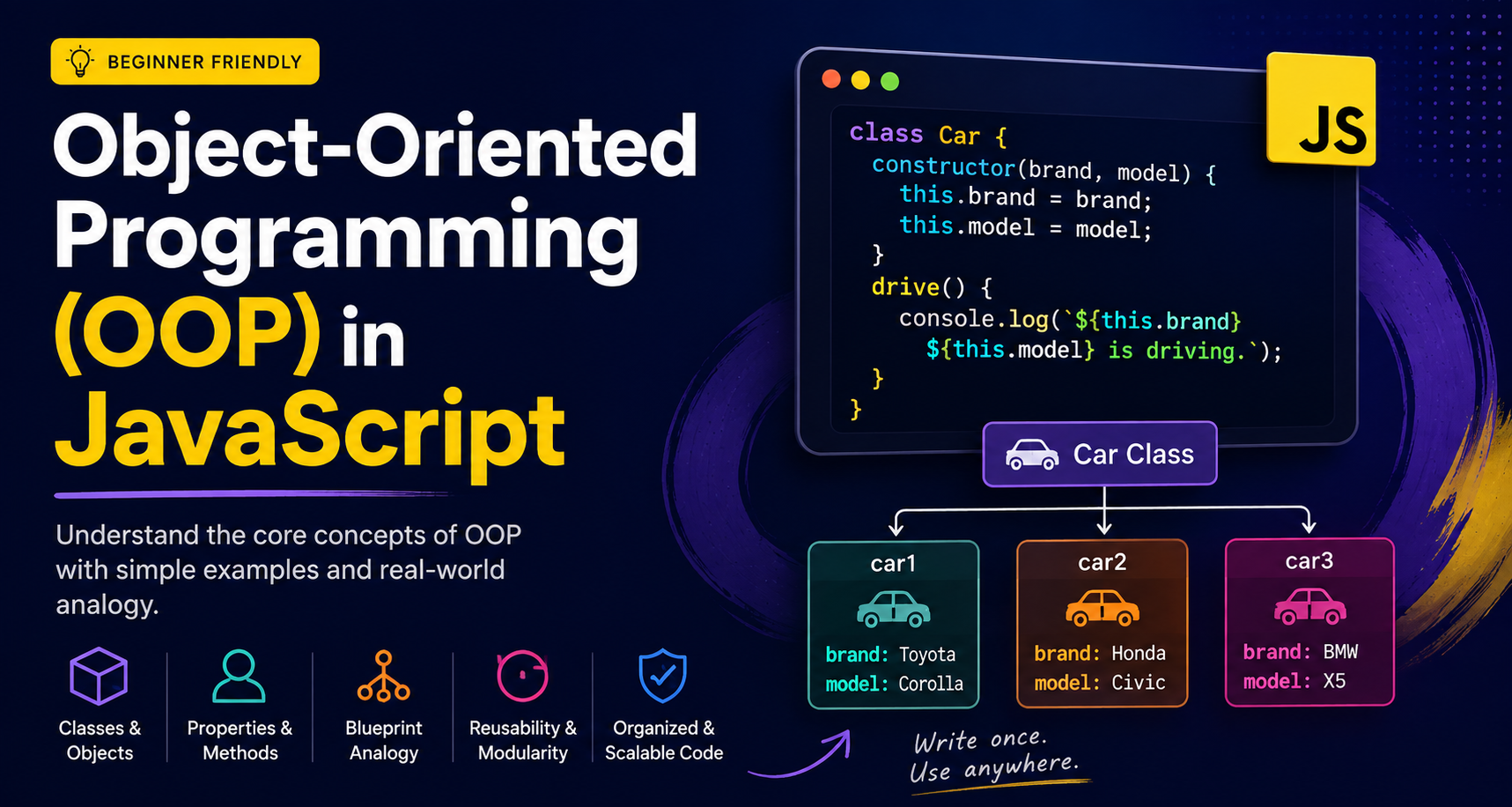
Think of this class as the blueprint:
                 Car CLASS
              ┌──────────────┐
              │ brand        │
              │ model        │
              │              │
              │ drive()      │
              └──────┬───────┘
                     │
              creates objects
                     │
          ┌──────────┼──────────┐
          ↓          ↓          ↓
        Car 1      Car 2      Car 3
       Toyota      Honda       BMW
       Corolla     Civic        X5
The class defines the structure and behavior.
The objects contain the actual values.
Creating Objects From a Class
A class is only a blueprint. We still need to create objects from it.
JavaScript uses the new keyword:
const car1 = new Car("Toyota", "Corolla");
const car2 = new Car("Honda", "Civic");
const car3 = new Car("BMW", "X5");
Now we have three separate objects:
             Car Class
                │
               new
                │
     ┌──────────┼──────────┐
     ↓          ↓          ↓
   car1       car2       car3
 Toyota      Honda       BMW
 Corolla     Civic        X5
All three objects follow the same blueprint, but their data is different.
This is where code reusability becomes powerful.
Instead of designing the structure three times, we define it once and reuse it.
What Does the new Keyword Do?
When you write:
const car = new Car("Toyota", "Corolla");
you're essentially saying:
"Create a new object using the
Carclass."
The basic flow is:
new Car(...)
     │
     ↓
Create a new object
     │
     ↓
Initialize its data
     │
     ↓
Return the object
That's why you'll commonly see:
const user = new User();
const product = new Product();
const student = new Student();
The Constructor Method
Now let's understand this:
constructor(name, age) {
  this.name = name;
  this.age = age;
}
A constructor is a special method that runs automatically when we create a new object.
For example:
class Person {
  constructor(name, age) {
    this.name = name;
    this.age = age;
  }
}
When we write:
const person = new Person("Maaz", 20);
the constructor runs automatically.
Think of it like this:
new Person("Maaz", 20)
          │
          ↓
     constructor()
          │
          ├── name → "Maaz"
          └── age  → 20
          │
          ↓
      Person Object
The constructor's main job is usually to initialize the new object's properties.
Understanding this
You will see this everywhere in JavaScript classes.
Consider:
class Person {
  constructor(name, age) {
    this.name = name;
    this.age = age;
  }
}
Here:
this.name
means:
"The
nameproperty of this particular object."
For example:
const person1 = new Person("Maaz", 20);
const person2 = new Person("Ali", 21);
The result can be imagined as:
person1
┌──────────────┐
│ name: Maaz   │
│ age: 20      │
└──────────────┘

person2
┌──────────────┐
│ name: Ali    │
│ age: 21      │
└──────────────┘
When the constructor creates person1, this refers to person1.
When it creates person2, this refers to person2.
For now, remember:
thisrefers to the current object when working with an object instance.
Methods: Giving Objects Behavior
Objects don't just store information. They can also perform actions.
These actions are called methods.
For example:
class Person {
  constructor(name, age) {
    this.name = name;
    this.age = age;
  }

  introduce() {
    console.log(`Hi, I'm ${this.name}.`);
  }
}
Create an object:
const person = new Person("Maaz", 20);
Call its method:
person.introduce();
Output:
Hi, I'm Maaz.
So now our object contains:
Person Object
├── name
├── age
└── introduce()
This is an important OOP idea:
Objects can contain both data and behavior.
A Practical Example: Student Class
Let's build something you might actually use in an application.
Suppose we're creating a university system.
Every student has:
name
age
And every student should be able to display their details.
class Student {
  constructor(name, age) {
    this.name = name;
    this.age = age;
  }

  displayDetails() {
    console.log(`Name: ${this.name}, Age: ${this.age}`);
  }
}
Now create multiple students:
const student1 = new Student("Maaz", 20);
const student2 = new Student("Ali", 21);
const student3 = new Student("Ahmed", 22);
And use them:
student1.displayDetails();
student2.displayDetails();
student3.displayDetails();
Output:
Name: Maaz, Age: 20
Name: Ali, Age: 21
Name: Ahmed, Age: 22
Look at what happened.
We wrote the structure once:
Student Class
     │
     ├── name
     ├── age
     └── displayDetails()
Then created many objects:
             Student Class
                  │
        ┌─────────┼─────────┐
        ↓         ↓         ↓
     student1  student2  student3
       Maaz       Ali      Ahmed
        20        21         22
That's reusability in action.
Basic Idea of Encapsulation
Another important OOP concept is encapsulation.
Don't worry about the complicated definition.
At a beginner level, think of encapsulation as:
Keeping related data and the operations that work with that data together, while controlling how that data is changed.
Consider a bank account.
class BankAccount {
  constructor(balance) {
    this.balance = balance;
  }

  deposit(amount) {
    this.balance += amount;
  }

  withdraw(amount) {
    if (amount > this.balance) {
      console.log("Insufficient balance.");
      return;
    }

    this.balance -= amount;
  }
}
Now:
const account = new BankAccount(1000);

account.deposit(500);
account.withdraw(200);
The account's data and related operations are grouped together:
             BankAccount
          ┌───────────────┐
          │ balance       │
          ├───────────────┤
          │ deposit()     │
          │ withdraw()    │
          └───────────────┘
This is the basic idea.
JavaScript has more advanced ways to implement encapsulation, such as private fields (#), getters, setters, and modules. Those can be learned later.
Class vs Object: Never Confuse These
This is one of the most common beginner mistakes.
Class
A class is the blueprint.
class Student {
  // blueprint
}
Object
An object is an instance created from that blueprint.
const student = new Student();
Visualize it like this:
CLASS
(Blueprint)
   │
   │ new
   ↓
OBJECT
(Actual instance)
Or with multiple objects:
                 Student
                  CLASS
               (Blueprint)
                    │
             ┌──────┼──────┐
             ↓      ↓      ↓
          Object  Object  Object
          Maaz     Ali    Ahmed
Once this distinction is clear, classes become much less intimidating.
Why Use OOP?
Imagine you're building a large application.
You might have:
Application
├── Users
├── Products
├── Orders
├── Payments
└── Notifications
Each entity has its own data and behavior.
For example:
User
├── name
├── email
├── login()
└── logout()

Product
├── name
├── price
└── updatePrice()

Order
├── items
├── total
└── calculateTotal()
OOP gives you a structured way to model these entities.
The biggest beginner-friendly benefits are:
Reusability — define a structure once and reuse it.
Organization — keep related data and behavior together.
Maintainability — larger codebases can become easier to manage.
Modeling — real-world entities can be represented naturally.
A Complete Example
Here's everything together:
class Student {
  constructor(name, age) {
    this.name = name;
    this.age = age;
  }

  displayDetails() {
    console.log(
      `Student: ${this.name}, Age: ${this.age}`
    );
  }
}

const student1 = new Student("Maaz", 20);
const student2 = new Student("Ali", 21);

student1.displayDetails();
student2.displayDetails();
The complete mental flow is:
class Student
      │
      │ defines
      ↓
properties + methods
      │
      │ new Student()
      ↓
┌───────────────┐
│ student1      │
│ name: Maaz    │
│ age: 20       │
└───────────────┘

┌───────────────┐
│ student2      │
│ name: Ali     │
│ age: 21       │
└───────────────┘
You define the blueprint once and create as many instances as your application needs.
Your Practice Challenge
Now try building the Student class yourself.
Requirements
Create a class called Student.
It should have:
nameagedisplayDetails()method
Then create at least two student objects.
Your goal should be to reach something like:
Student Class
     │
     ├── name
     ├── age
     └── displayDetails()
            │
      ┌─────┴─────┐
      ↓           ↓
   Student 1   Student 2
     Maaz         Ali
      20          21
Try it before looking at the complete example above. Writing it yourself is where the concept really sticks.
The Key Idea
If you're new to OOP, don't try to memorize everything at once.
Remember this:
CLASS
  ↓
Blueprint

new
  ↓
Creates an object

CONSTRUCTOR
  ↓
Initializes the object

PROPERTIES
  ↓
Store data

METHODS
  ↓
Define behavior

OBJECT
  ↓
Actual instance created from the class
Or, in one picture:
                 CLASS
              (Blueprint)
                   │
                  new
                   ↓
              ┌─────────┐
              │ OBJECT  │
              ├─────────┤
              │ Data    │
              │         │
              │ Methods │
              └─────────┘
That's the foundation of OOP in JavaScript.
The Core Insight
Object-Oriented Programming isn't about memorizing complicated terminology.
At its core, it's about organizing related data and behavior into objects and creating reusable structures for those objects.
A JavaScript class gives you a blueprint:
class Student {
  constructor(name, age) {
    this.name = name;
    this.age = age;
  }

  displayDetails() {
    console.log(`${this.name} is ${this.age} years old.`);
  }
}
Then new creates actual objects from that blueprint:
const student1 = new Student("Maaz", 20);
const student2 = new Student("Ali", 21);
So whenever you see:
class → constructor → new → object → method
think:
Blueprint
   ↓
Build
   ↓
Object
   ↓
Data + Behavior
Once this becomes natural, concepts like inheritance, polymorphism, abstraction, private fields, getters, and setters become much easier to learn.
The goal isn't to write more classes.
The goal is to use the right structure to make your JavaScript applications clearer, more reusable, and easier to maintain.
Bonus: What Are JavaScript Classes Really?
JavaScript Classes vs. C++/Java Classes
If you've worked with C++ or Java, there's an important difference to understand.
When you write:
class Student {
  constructor(name) {
    this.name = name;
  }
}
JavaScript's class syntax may look very similar to a class in Java or C++.
But JavaScript's object model works differently.
Java and C++ are traditionally class-based languages. Classes are a fundamental part of how objects and inheritance are structured.
JavaScript, however, is fundamentally prototype-based.
Java / C++
     │
     ↓
   CLASS
     │
     ↓
  OBJECTS


JavaScript
     │
     ↓
 PROTOTYPE SYSTEM
     │
     ↓
 class syntax
 (cleaner interface)
     │
     ↓
  OBJECTS
So don't assume:
classin JavaScript = exactly the same kind of class as in Java or C++.
The syntax looks familiar because JavaScript's class syntax was designed to provide a more familiar and cleaner way to work with objects and inheritance.
Underneath, JavaScript still uses prototypes.
Why Does This Matter?
For everyday beginner-level JavaScript, you can comfortably write:
class Student {
  constructor(name) {
    this.name = name;
  }

  introduce() {
    console.log(`Hi, I'm ${this.name}`);
  }
}
You don't need to think about prototypes every time you create a class.
But as you progress into topics such as:
inheritance
extendssuperprototypes
method lookup
Object.getPrototypeOf()
understanding this distinction becomes very useful.
So remember this simple rule:
JavaScript looks class-based on the surface, but its object model is prototype-based underneath.
That is one of the most important differences between JavaScript's class syntax and the traditional class model you'll encounter in languages such as Java and C++.